
Review
Streetsmart Edge (SSE) can be launched/downloaded from the Schwab website. Schwab has made StreetSmart Edge available to all account holders. A call to their helpline (800-435-9050) is required to set it up. If you want to run SSE on an underpowered computer, are having performance problems, or want to run on a Mac check out the cloud version of SSE, see this post for more information.
Before I get to my complaints here are some things that I like:
- Recently Schwab addes the ability to export charts (including option charts) to excel
- Accessing/trading options is very nicely done. Option chains come up collapsed down to expiration dates, which you can then open up. Copying options to a watch list is conveniently accomplished with copy and paste commands. Current positions are shown in the option chains—a nice feature.
- Option chains allow an adjustable number of strikes from 1 to 100 or all. It’s very nice to not have to deal with huge lists of options when my interests are relatively close to the money.
- General availability of midprice quotes, halfway between the ask/bid price. This is an essential capability for any serious option trading and very useful for lower volume securities.
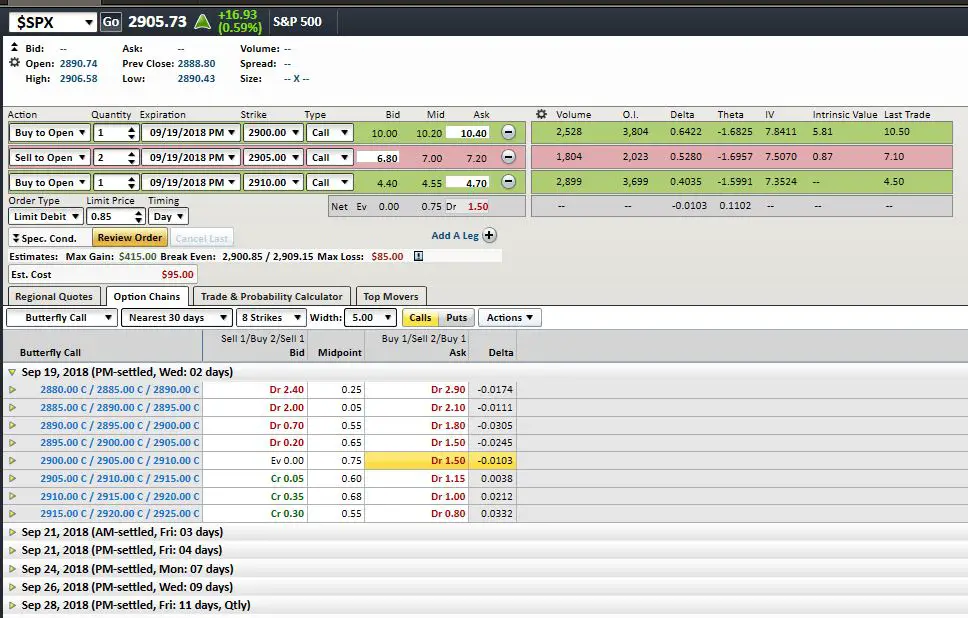
- The “Trade-All in One” tool provides excellent capabilities for multi-sided option trades (e.g, spreads, calendars, buy-writes, butterflies, condors)
- Once you select your trade the options appear at the top (see snapshot below). You can then further customize the options you want (e.g., strikes, expirations)—this avoids significant frustration if you have a different opinion than the tool on what the strikes for say a strangle should be…
- Recently Schwab has added the capability to show specific custom information about the trade you have set up (e.g, Option Greeks, intrinsic value) this panel, on the right of the trade setup, allows information normally only available on the option chains to be brought up next to the specific trade. Very nice!
- You can add additional tabs to the tool. I use this for displaying alternate option strategies, or the plain options chains with all the Greeks
- The midpoint price, the max gain/loss, current underlying price are all right there
- The scrolling/time windowing capabilities located at the bottom of charts are excellent
- SSE’s ability to export data, including option Greeks from a watch list to a spreadsheet is useful
- Very good coverage of option strategies, including calendars and ratio spreads. All the Greeks available for the options in the strategy
- ETF/ETN intra-day indicative values are available (effectively NAV). To obtain these add a “$” and the beginning, and “.IV” at the end of the symbol (e.g., $SPY.IV). These are helpful in getting good price execution on orders.
- Charts include the ability to add option IVs as a study. This is a big help in looking at typical IV run-ups before earnings reports.
- Options chains for VIX options use the VIX future price for the same expiration as the effective underlying. This is necessary for the computed Greeks to be correct.
- Option spreads are now allowed for cash-settled index options (e.g., SPX, VIX) in IRAs.
Some complaints:
- Indicative value for VXX is not available. For any Exchange Traded Product (ETP) it is important to be able to determine what the value of the underlying index/underlying portfolio. At times the current trading price for an ETP might differ significantly from the IV price, which could mean significantly overpaying or selling too cheap.
- No symbol for Bitcoin. Its market cap is in the hundreds of billions of dollars. Time for Schwab to start supporting it!
- In the age of Google/AI it is embarrassing how Schwab requires you to enter a ticker symbol exactly right before it will recognize it. You must have symbology, ticker, number of blanks, capitalization, date, and strike price exactly right before it is recognized. You’d think they could figure out that “VIX” was “$VIX”, “spy” was SPY, “c” was “C”, and that 61 was 61.00.
- Text messages & Email not supported for alerts—really?!
- SSE wants everything in upper case. If you type in symbols in lower case it capitalizes them. OK so far. However, if you try to enter in capital letters, matching what is on your displays it very unhelpfully lower cases those letters so that the symbol is not recognized. My favorites are indexes like $VIX or intra-day indicative values (e.g., $VXX.IV) where you have to hold down the shift key for the “$” and then use lowercase for the rest. This is so wrong. Just capitalize everything, OK?
- The charts have a lot of nice features, but they have a “frequency centric” approach. You must pick the frequency (e.g., 1 minute or daily) and then the chart then picks the duration (e.g., 5 days or 254 days). This is bass-ackwards—I want to pick the duration and then have the package provide the maximum frequency it will deign to provide—the higher the better.
- Slow initial startup time. Even with a fast computer, the package takes a long time to startup. Switching layouts, or loading the layout from the central Schwab server extracts additional time. They have added a “quick launch” option on the settings, but it doesn’t seem to make much difference.
- The default on the colored “link” symbol in the upper right of many tools ties all the windows to the same ticker. Generally, if I open multiple tools I’m comparing things so having them all sync’d to the same symbol is counterproductive. To work around this I have to manually change the link to the “unlinked”, broken chain symbol—I think unlinked should be the default. The link feature is nice if you want to click through your watchlist and have a chart displayed for the highlighted symbol.
Some tips:
- To activate the bracket capabilities go to account details, positions tab, select a symbol, push the actions button and then look for the “add brackets” choice
- Default share/contract quantities can be set on a per symbol basis by going to general settings, trading tab, and then look for order quantity button
- Typically I’m using multiple computers in the course of a day so I use the save as / load from Schwab server capability located under “file” on the main window. This keeps my layout consistent between computers. This should be a default choice for the user—local or server-based layout at startup. Schwab now allows up to 5 different setups to be saved on their server.
- If you find yourself frequently flipping between different tools (e.g., watch lists and charts), consider putting them on different tabs. This avoids a lot of tool finding and you can flip contexts with a single mouse click. These tabs can be put on different displays if you have them.
- If you are running an older version I recommend you upgrade. You don’t have to remove your current version of StreetSmart Edge, you can download the new version from the Schwab site and install the newer version. I haven’t lost any settings. Your current version shows up in the upper right-hand corner of the application.
Wish List
- Symbol for Bitcoin, IV tracking for VXX & VXZ.
- More historical data at higher frequencies, e.g., 1 minute charts only go back a few days, come-on, memory is cheap now!
- Ability to save multiple leg option orders for later reuse. For example, if you want to monitor the mid-price of a call spread.
- Greek calculations for options are using time to expiration in coarse 1-day increments. This leads to significant errors when the time to expiration gets down to less than a week. Using more precise time until expiration (e.g, 30 minutes) would give more accurate Greeks during the day.
- Option charts using mid price (halfway between bid and ask) at some reasonable frequency, like 15 minutes, instead of relying on trade data which is infrequent for most options that are offered
- Charts for options that have expired
- Stop loss orders (both market and limit) that have a time delay parameter option that delays any action for a specified number of minutes. This would reduce the chances that a position is blown out by a flash crash.
Performance notes
- If you are having performance issues I recommend you call your broker and sign up for StreetSmart Edge in the Cloud.
Summary of Defects (in my opinion)
- SPX options that expire on Friday morning are not recognized as such until Monday morning! If you have a calendar call spread that’s short the just expired option this is ugly. If you have enough margin you can work around this by rolling up to a much higher strike.
- Charts setups don’t remember that mode has been set to bar format. They always go back to candlesticks on new charts
- Uncapitalizing letters that are typed in as capital
- If you enter a duplicate symbol in a watchlist your input is ignored—without notice/explanation
- Stock splits are not adjusted in .IV charts

StreetSmartEdge
Problem is when using bracket orders the stop loss triggers on the bid not the actual trade. This causes many trades to stop out without the price actually hitting the stop loss.
Example. If you have a Bracket Order Entry $101.00 with a $1.00 Stop Loss and a $2.00 Profit Exit you may stop out at $100.01
$100.00 stop loss
$ 99.99 Bid
$100.01 Actual Low
They sell your shares on the bid and you loose your money even though the stock didn’t actually hit your Stop loss.
I have been looking for a new broker and been comparing trading software. I haven’t found anything that I really like…for running on a MAC. Now that we know what the problems are what are people using for zero trade cost brokers and MAC hardware?
Vance, Thanks for providing a forum for this topic. I’ve used Schwab software since 1987. Street Smart Pro was the best option after they killed CyberTrader from lack of a user base .(I was head of the SoCal Schwab ACtive Trader group for several years) I was a beta tester for the EDGE platform and it was hard to give up some features of the old PPO version that have yet to be replicated.. I daytrade options and ETFs and find that the hands down best tool on the platform is the Hi./Lo colorized scrolling dashboard of new daily highs and lows which I set for all indices and stocks. Daytraders can consistently make money with this tool alone if you trade in the range of 2 to 5 minute bars. It actually took me about 4 months to get comfortable with EDGE after cutting the Pro cord. I’m a bit mystified by all these complaints about the platform as I seldom experience any slow downs, disconnects, trade lag time or refresh issues. My Toshiba PC laptop has 6 GB RAM4 and a 2.4GHz Pentium processor running Windows 8.1. I then run a 23″ external monitor off the laptop. I loaded the cloud version but did not like the citrix interface and deleted it.
What did make a noticeable difference in watchlist refresh speed was when I hardwired the laptop to the router with a CAT5 cable and disabled the wireless interface.There are a number of free programs to check the bandwidth and download speeds with a wireless vs a hardwired connection to the router. In my case my 75/75 Verizon service was actually delivering 27 Mbps on a wireless connection and 92 on a hard wired connection. I choose the later. Folks that are experiencing connectivity problems might try this cheap, immediate patch and compare the software performance.
Why can’t we export watch list data as a csv file from the cloud version ???
Hi Rick, What platform are you using. I tried it on my windows 10 system. Initially it said it could do it, but when I cleared the error a dialog popped up that enabled access to my system. If you click on that it takes awhile but eventually I was able to access my file system and export a csv watchlist to my system.
— Vance
I noticed today, May 6, 2015, that the volume figures being reported are not accurate. My numbers were compared to a Bloomberg system down the hall and for some stocks the Schwab volumes were highly inflated. A call to technical support passed the blame to a third party vendor feed. There was no caring that their system was reporting improper numbers. When I asked how I could verify the accuracy of the bid and ask prices I was told to compare the prices to an online stock quoting website. I also felt that there was no sense of urgency to fix the problem. I no longer have confidence in the reliability of the data reported on their systems.
SSEdge displays inconsistent values for closing prices of options: under Prev Close the values are correct, under Today’s Close the closing price of the underlying is shown instead of the option price. (this is only visible after the close)
You are still pushing this buggy stuff. CNBC works maybe sometimes, schwab agree with this BUG !!! News bug you can not store the news dates if you want to older news you have to do the change every time you enter a different ticker in the stock box. Are you getting paid commission for this blog ? BTW I have used it for 5 mins, me pro trader for many years and have many accounts with different clients.Hey and that is 5 mins into it I have wasted 1 hour and 30 mins today messing around with this junk.
Nope, not getting paid for this post. I use SSE all the time. Not saying it’s the best, just providing my impressions. Yes it has bugs–so does every piece of software on the planet. If you can provide a little more detail on the problems you found I’ll include them in the post.
Streetsmart edge is completely useless program with terrible charts, fonts, contrast, and it takes 2-3 times more space on the screens than SSP.
Once SSP is gone, I will drop Schwab as my trading platform provider.
guys it’s free, no fee and has all at same place. you can’t find anything like this for free no where and i hated td ameritrade’s platform or what ever. they have nothing
Vance I am guessing your not a trader and if you are a part time one. If you are a day trader this has to be the worst trading platform to be using and it is still full of bugs. How much did Schwab pay you for this review ? Street smart edge is a load of rubbish. Me full time day-trader where easy to use software is a must, if I want to cut it with the market don’t use this junk.
Boris, Schwab did not pay me for this review. I’m not a day trader, but trade frequently and I don’t encounter a lot of bugs. Rather than attacking me perhaps you could add some value by referencing what you think is a trading good package, or describing specific bugs that Schwab could fix.
— Vance
Sure level 2 window, BUY SELL SHORT way to close together and you could very easy hit the wrong button loads of stupid things like that another thing that is annoying is the colors you only have two choice as basic. Just trying to set up my live 1 min chart does it work does it hell ! here is my video review and I will do a better one soon as I done that very quick, but I will go over a few bugs that I dislike as a active trader. If you trade a few times a week fine but if you trade and need to get in and out in seconds this is not day-trading software.
http://www.youtube.com/watch?v=9lghNyzt9CI
1st fix is to have the program monitor CPU usage to dump to next availiable cup, next a simple redesign and get rid of ALL un-usable wasted space that says SSEdge,, (NO HEADERS) next Free Floating window’s, (Didnt MSFT FIX this SH*T years ago, This reminds me of somthing out of the 8088 days, + Schwab needs to have faster servers that can at least keep up with 4 charts and 4 layouts in real time, Edge is a waste of time, money and I have not even got into the bug’s,
Waite til you open 2 or more option charts and pick the one you want and it Executes the last one open not the one you just clicked on to buy or trade etc.. This Is a Ripoff and Ive lost a ton on it – beyond worthless and im a 30 year investor with Schwab, humm
Edge is the worst software one can see.
Agree worst trading platform, street smart pro is ideal for hardcore day-traders executions are instant if your trading Nasdaq. Why schwab want to use this new crap is beyond me.
I have SSE performance issues also. Be advised that I uninstalled my antivirus software and SSE immediately got extremely responsive – night and day. I am working with the antivirus vendor; they are interested in this. I have an older Core 2 Duo laptop (somewhat upgraded – 8 GB RAM, high-end SSD) and most software screams on it, with or without antivirus: this issue is specific to SSE. I use an overall security software, and even though I tried to turn off all the various shields, only full uninstall made SSE snappy again, so it seems that SSE is doing something that a market-leading, very fast and well-reviewed security suite does not like. Hmmm!
Totally useless program, options are a guess at best, and real time quotes do not exist, delayed feed, and single core overloads the fastest of systems, I have a fully custom tunable 8 core pushed to 4.7ghz, and it still will overload just 1 core no core division at all, this is in-sain windows had window’s back in the 1990’s 3.1, SSE slaps one big window and has more header room than it does for any charting, viewing or much of anything else, I have 125gbs down load and their servers must be from the 80’s, total wast to use for tradeing if you open more than 2 trading windows and 2 charts, – SSP was the light this is schwab getting paid by the HFT’s
I do like the new cloud-based version of SSE. It works well on my Mac without having to run virtualization, although the file saving feature is wonky. My main gripe is that you can’t trade mutual funds on either SSE platform. I don’t do it often, but it would be really convenient to manage everything in one place.
SSPRO user from the begenning, when it was cybertrader!! SSEdge is totally cool for everyone who likes the looks and the full service schwab has to offer, it is like being in a luxery cruise 747 dreamliner with services galore, however if you are daytrading this is not for you as you are going to war against F-16’s dated as they are but far more effective as you can aim click and enter and exit a trade for 10 bucks in 15 sec’s, it takes edge that long just to load the chart’s so I think you will like edge if you only need to ck you account a few times a month, or rebalance, but for active trading or daytrading its a goodyear blimp, (beautiful) but fighting against F-16’s it just cannot do it, humm seems like they should have sspro just coming out!! and retireing edge, fwiw 30yr trader glgt to all
I have a Core Duo T9400 with 4 GB of RAM and a decent video card running Windows 7. StreetSmartEdge runs very slowly, often locks when updating information, and crashes several times a day. Schwab says they recommend an i7 3rd gen quad core with a lot of RAM. Its a 32 bit application.
This may be the best example of why brokerage firms trying to create trade stations without strong in-house technology cultures will not do well. SSE is a nice idea but really, really bloated. If you crash and ask for help enough times Schwab will tell you to play with your ports, reboot, blah blah blah, but its mostly wasted motion. I will now need to upgrade to a new computer or switch brokerages.
Hi,
I had the same problem. Schwab is now offering a cloud version of SSE that sidesteps the perf problem by running the main application on a central server. My experience with it is that the performance is much better. You can call Schwab at 800-435-4000 and ask to sign up for the package.
— Vance
Hi,
I had the same problem. Schwab is now offering a cloud version of SSE that sidesteps the perf problem by running the main application on a central server. My experience with it is that the performance is much better. You can call Schwab at 800-435-4000 and ask to sign up for the package.
— Vance
StreetSmartEdge for Mac users (cloud)
A complete waist of time, designed by monkeys.
I’ve found StreetSmart Edge on the cloud to perform much better than native on Windows 7. What issues do you have?
— Vance
Vance…I have used Edge in the Cloud (EitC) and have the same performance issues (lagging, locking up, delayed order executions resulting from lags, uncertainty of order execution for 10 to 15 seconds – all problems in a fast market). Schwab Tech support assessed my computer system and internet connectivity as “more than adequate” to run the program. Earlier this year, Schwab customer representative acknowledge that Edge program was built on a FAULTY system design. A third party software developer generated problem that Schwab is VERY RELUCTANT to acknowledge. Typical response is “we have not had any reported issues regarding Edge from our customers.” A blatantly FALSE statement as I personally know individuals who reported the EXACT same issue to Schwab’s Technical support and Help desk. I documented many issues in hopes of helping them identify and improve the Edge program. Yet, it seems Schwab staff are informed to DENY issues exist.
I really looked forward to using Edge (in any form – cloud or desktop) yet frustration is turning me away from recommending Schwab as a Broker.
Also forgot to mention, Edge and EitC updates seem to generate new unresolvable issues. Something as simple as VWAP indicators are not consistently displayed. Shows on one chart and not on another with the exact same settings. Bottom line….Stay away from Edge, in my opinion.
Hi MJunk,
I know how frustrating it is to deal with problems like this. I was very relieved when EitC addressed my performance problems. I do have one internal contact with Schwab that I would be willing to relay your problems to. If you’d like to try that please send an email to [email protected] with the basics to start with (e.g., your OS, most serious problem) and I will relay that information.
— Vance
Streetsmart edge continually lags or locks up on a powerful window 7 computer. Schwab does not have any reason for it. Would not recommend using Edge for active traders.
fed up with streetmart pro, is tradestation or ib a better option?
Sorry, I don’t know anything about either of these. Fidelity active trader pro works decent for me, at least it doesn’t have the performance problems I’m seeing with SSE. What specific problems did you have? I’ll be updating my review soon and I like to compare notes.
— Vance
Believe it or not I think Think or Swim is the best out there… They just have the highest commission (I guess for good reason)
I’ve tried the ‘right click, properties’, opted for both vista and xp, no change, still starts minimized. I believe the problem is related to the nvidia quadro fx 3800 m video card. I had sse working for a couple of months (unfortunately I don’t remember exactly what hoops i jumped through to do it). when i updated the nvidia video driver last week, i was back to sse starting minimized. reverting back to the previouis driver made no difference. I assume sse and nvidia quadro fx 3800 m just don’t get along. massively frustrating.
FYI, hovering over the SSE taskbar tag and using the arrow keys does nothing, the program remains minimized. maddening.
Hi daj,
What does it show when you right click on the tag? Mine shows SSE, pin program to task bar, and close window. If you see SSE, can you right click on it and see “open” as a choice? properties? Have you tried running it in Vista compatibility mode?
— Vance
Hi daj,
I was on the phone with tech support last Friday for over an hour with similar issues as everyone else. Locked up, slow and high, 25%, cpu usage. TS guy was sharp and downloaded my layout to his computer. Guess what, he had the same problems I did! Go figure.
I was having the taskbar/SSE minimized issue on wife’s laptop. TS said to hover over the SSE tag and use arrow keys to bring it into view. I didn’t try it, he was just doing this remotely.
D
Windows 7 ultimate. More details: after an exhaustive internet search, i found someone who told me to find this file: atwpkt264.sys and rename it with the “.bak” extension. I did so and, much to my surprise, edge worked. A couple of months later, i made the mistake of updating my nvidia quadro fx 3800 m driver. Now i’m back to edge opening minimized in the tray and not maximizing under any circumstances. I rolled the driver back to the previous version and searched for the file again. the atwpkt.bak file is the only one found. Obviously there is some problem with displaying edge with this particular video card. I spent a solid hour with schwab support, their conclusion was that i have a bad video card. Nonsense.
I’m using a dell precision m6500 covet machine that is one year old.
junk. starts minimized every time, seems incompatible with my NVIDIA graphics card. I have never been able to “maximize” the program once it starts up. It remains minimized in my taskbar regardless of what i do. schwab was no help after 1 hour.
Hi Daj,
What OS are you trying to run on? Mine runs, but works much better on Vista than Windows 7 — go figure.
— Vance
Basically junk.
— the Schwab development team have completely corrupted both platforms…particularly Edge which I find useless..I mean completely.
Beyond comprehension.
Yup. Latest version; just update yestiddy.
Again – I’m OK with the mediocre charting; I don’t use a lot of such tools. I just need to see the Level II data and work with a program that gives me speedy execution.
I’ve tried the latest version of SSE and it is horrible! Whenever order volume gets heavy the program locks up … 5-10 seconds for each and every mouse click or key stroke. Even when volume isn’t heavy, it’s slow.
I have 20+ yrs professional experience with computers; there’s nothing wrong with my CPU, internet speed, etc. It is definitely this awful program.
Even opening up ports on my router at the request of Schwab tech support did not help.
I’m on the hunt for something better …
Hi Billy,
I’ve also noticed that 1.8.7 took a step backwards in stability. Indicates to me that their testing suite is not very comprehensive. Are you using version 1.10.25, the one that is currently downloadable?
— Vance
Lacks customization features. very slow and buggy
I have tried using SSE and it does not display well. I have a 4 monitor system and have upgraded drivers and also installed a new video card.
According to Schwab tech support I have more than enough horsepower with my overall system.
Sticking with SS Pro until I have no other choice, then maybe switch brokers.
I find this software to be unusable. It looks better than Streetsmart Pro but it’s got usability problems, display bugs, and lack of basic features. I’m actually shocked that Schwab has released this in the current state.
Moreover, the development team does not communicate the way in the way that modern development is done on the web. I’ve no idea when the next release is or what it’ll contain. I’m shocked at how amateurish this product release is from a major company especially when you consider the amount they are spending advertising it on TV (cnbc).
So I’m going back to their Pro software (which isn’t pretty and lacks features, but it works all in all) until this one is ready for prime time, which is likely to be many months from now ( mid-may 2011) based on the process I’m experiencing.
I’m disappointed!!!
Hi Jeff,
I’ve been using SSE in spite of its flaws primarily because it works better through corp. firewalls than Fidelity Trader Pro or SS pro (didn’t work at all for me). I think Schwab is monitoring my site, so if you have some key complaints I’d be glad to post them.
Most of the problems I have seen have been configuration style problems–not remembering chart settings and the like. I agree not publishing updates is annoying. The 1.4.7.0 build I’m using now fixed a lot of problems and I just stumbled onto it.
— Vance